
Splat Capture
Point your phone at a real object, walk around it, and get a photorealistic 3D model — trained on your own GPU, ready to 3D print.
Gaussian splatting is a newer 3D reconstruction technique that produces dramatically better results than traditional mesh photogrammetry, especially for organic shapes and fine details. Splat Capture wraps the entire pipeline — photo capture, transfer, SfM, training, viewing, and export — into a single cohesive tool that runs on consumer hardware.
Why Gaussian Splatting
Traditional photogrammetry reconstructs a mesh — it works well for large objects with clear geometric structure but struggles with hair, fur, translucent surfaces, and fine detail. Gaussian splatting represents the scene as millions of 3D Gaussians (ellipsoids), each with its own color, opacity, and orientation. The result is a volumetric representation that captures lighting and fine detail far better than a polygon mesh.
The .splat format stores 32 bytes per gaussian: 3×float32 position, 3×float32 scale, 4×uint8 colour, 4×uint8 rotation. gsplat 0.1.12 is specifically required for sm_61 GPUs like the GTX 1060 — v1.0+ requires sm_70 or higher.
The tradeoff is compute: 30K training iterations on a consumer GPU takes 15–25 minutes. The output isn't directly 3D-printable either — the export step converts the gaussian field to a mesh (STL/3MF) for printing, with some loss in fine detail at the conversion stage.
Setup
Python deps
pip install torch --index-url https://download.pytorch.org/whl/cu124
pip install gsplat==0.1.12 fastapi uvicorn python-multipart qrcode pillow customtkinter scikit-image
COLMAP
Download COLMAP 4.x and place it in ./colmap/ in the project root.
.env configuration
Configure CUDA_HOME, TORCH_CUDA_ARCH_LIST, MSVC_ROOT, SDK_ROOT, and SERVER_PORT in .env.
Android app
eas build --platform android --profile previeweas update --branch previewPipeline
Launch Desktop App
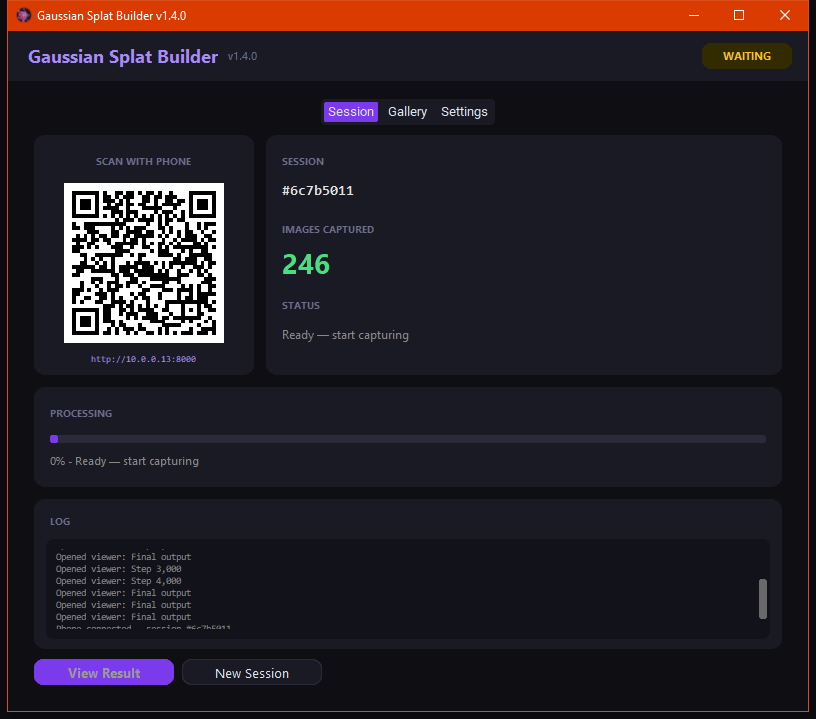
The Windows app (Python + CustomTkinter) starts a local FastAPI server and displays a QR code and live status. It's your command center for the whole pipeline.
Connect Android App
Scan the QR code with the Splat Capture Android app (Expo SDK 54 / React Native). It connects over WiFi to the PC, no pairing or Bluetooth required. Distributed via EAS build.
Auto Capture (v2.0)
Choose Small Object (60), Medium (120), or Room (200) mode. v2.0 fires continuously at 0.4s intervals — walk around the subject while the app captures and queues uploads in the background. Flashlight toggle, auto-reconnect if WiFi drops, and a collapsible gallery to review shots as you go.
WiFi Transfer
Photos stream to the PC as you shoot via queue-based background uploads. No USB, no cloud. Tailscale remote access is supported if the phone and PC aren't on the same network. They land in a dated session folder ready for processing.
COLMAP Structure-from-Motion
COLMAP 4.x runs feature extraction and sparse reconstruction. A quality gate checks coverage before training starts — if the capture is too sparse or blurry, you get a warning before wasting GPU time. Sequential matching for large (200+) image sets.
Gaussian Splat Training
30,000 iterations of gsplat 0.1.12. Fixed densification accumulates gradient norms (not vectors) matching the 3DGS paper — 13% better L1 loss. GPU auto-detection tunes presets per hardware. Grows to 20K gaussians with early stopping, checkpoint/resume, and OOM recovery. GTX 1060 trains in roughly 15–25 minutes. RunPod cloud GPU available for when you don't want to tie up your local machine.
WebGL Viewer
The trained splat loads in a WebGL viewer (based on antimatter15/splat) embedded in the desktop app. Orbit, zoom, and inspect the result before committing to export.
Edit & Export
A Three.js splat editor lets you trim unwanted gaussians (background clutter, floating artifacts) using box or sphere selection. Export the cleaned model to STL or 3MF for 3D printing.