

mono-izer
Right-click a stereo WAV or MP3 and get a mono copy, or split it into two mono files. Nothing else touched.
Built for stacks of 48 kHz 24-bit recordings that were tracked in stereo but only need one side. Sample rate, bit depth and tags stay exactly as they were.
Windows 10/11 · No admin rights required · ffmpeg installed for you if missing
Before and after
Stereo in — left (teal) and right (orange)

Mono out — the left channel, untouched

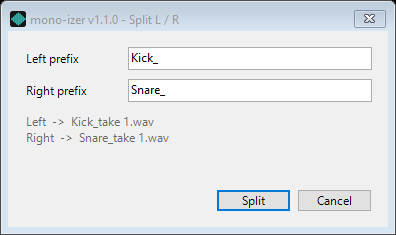
Split L / R — one prefix per side, asked once per batch
What it does
Features
Right-Click, Done
Select stereo .wav or .mp3 files in Explorer, right-click, open mono-izer and pick Make mono (left channel). No window, no settings — the mono copy appears next to each file.
Split L / R
Two sources on one stereo file? Pick Split L / R and type a prefix for each side — Kick_ and Snare_, say. Each file becomes two mono files, one per channel. One dialog for the whole selection, and it remembers your last prefixes.
Lossless for WAV
The output uses the same PCM codec as the source, and ffmpeg's channelmap copies the left channel without converting the sample format. The mono file is bit-for-bit identical to the source's left channel.
Batch Without the Load
Select a whole session of recordings and right-click once. Files are converted one at a time at low priority, so a long batch does not slow down anything else running.
Never Overwrites
If take_mono.wav already exists, the next one is take_mono_2.wav. Errors are collected into one dialog at the end of the batch, and every result goes to a log file.
Installs What It Needs
If ffmpeg is not on your PATH, the installer downloads the newest release from GitHub, checks its SHA-256 and adds it to your PATH. FFmpeg Convert, Shrink Menu and Doc Convert share the same copy.
No Admin Rights
All registry keys written to HKCU. Installs and uninstalls without an elevation prompt, with a normal entry in Settings › Apps.
Install
One-click (recommended)
Download MonoIzer-Install.exe from Releases and run it. Installs to %LOCALAPPDATA%\MonoIzer\ with no admin prompt. The installer is code-signed (publisher Yuval Olsha) and runs no scripts.
Manual install
powershell -ExecutionPolicy Bypass -File install.ps1